Dashboard Page Overview
1. Introduction
The Dashboard Page provides an overview of student application data and key statistics for the current month. It allows you to track the status of student applications across different stages—Application, Approved, Rejected, and Waitlisted. The page also offers visual representations in the form of graphs and charts to make it easier to analyze and manage data.
The Dashboard Page includes:
- Student Application Graph
- Scheduled Meetings
- Application Statistics by Tags, School, and Grade
- Campus Status Summary
2. Accessing the Dashboard Page
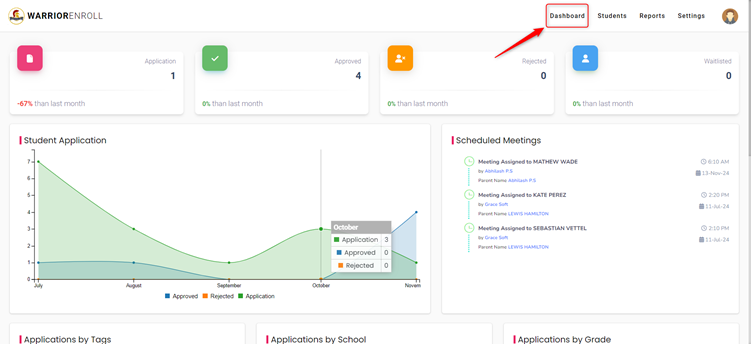
To access the Dashboard Page:
- Click on the "Dashboard" located in the top-right corner, near the Students section.
3. Dashboard Page Overview
Once you’re on the Dashboard Page, you will see various sections that provide insights into student applications and their statuses.
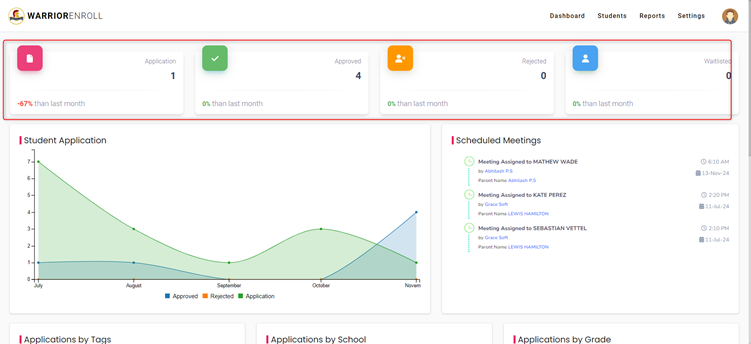
Application
- Overview: This section shows the total number of student applications submitted in the current month.
- Additional Details: It also displays the percentage change in applications compared to the previous month. This helps you track application trends over time.
Approved
- Overview: This section provides the number of applications that have been approved in the current month.
- Additional Details: It also shows the percentage change compared to last month’s approved applications, helping you track approval trends.
Rejected
- Overview: The Rejected section shows the number of student applications that have been rejected in the current month.
- Additional Details: The percentage change from last month's rejections is also displayed for comparison.
Waitlisted
- Overview: This section displays the number of student applications placed on the waitlist for the current month.
- Additional Details: It also shows the percentage change from the previous month's waitlisted applications.
Student Application
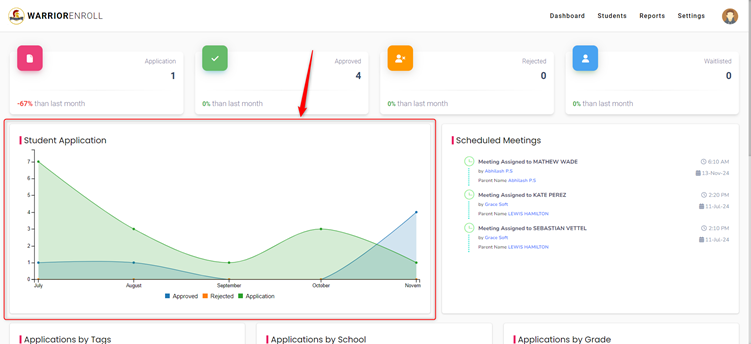
- Overview: This section displays a graph representing the number of student applications in each status (Approved, Rejected, Submitted) for the current month.
- Graph Details: The graph uses a line chart, where the x-axis represents the months, and the y-axis represents the number of applications. This allows you to quickly compare application trends over time.
Scheduled Meetings
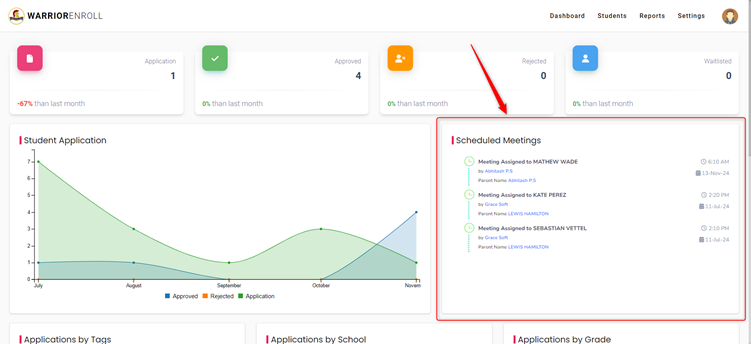
- Overview: This section shows the meetings scheduled between students and the principal.
- Additional Details: It includes the date and time of the meetings, along with scheduled by and parents name.
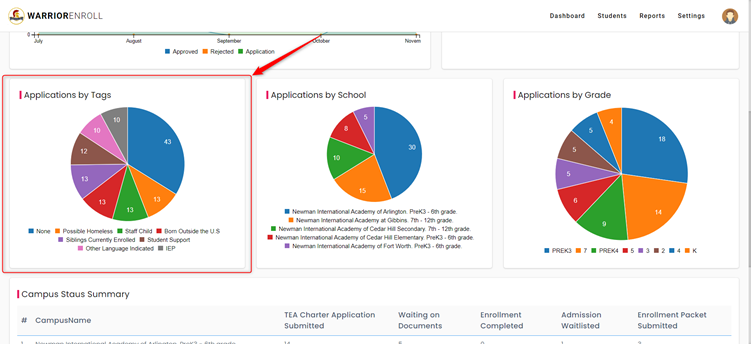
Application by Tags
- Overview: This section displays the number of applications categorized by tags. Tags are used to flag certain characteristics or statuses of applications.
- Visualization: The section displays a Pie Chart, which represents the distribution of applications by different tags. The chart highlights the tags with the highest number of applications.
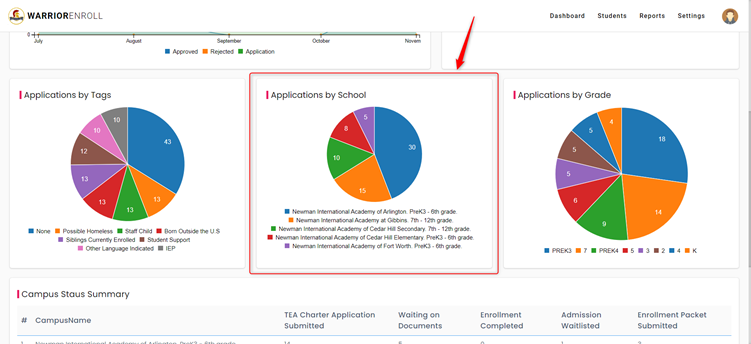
Application by School
- Overview: This section shows the breakdown of applications based on the selected schools.
- Visualization: Similar to the Application by Tags section, this information is shown in a Pie Chart that reflects the distribution of applications among different schools. The chart will highlight the school with the highest number of applications.
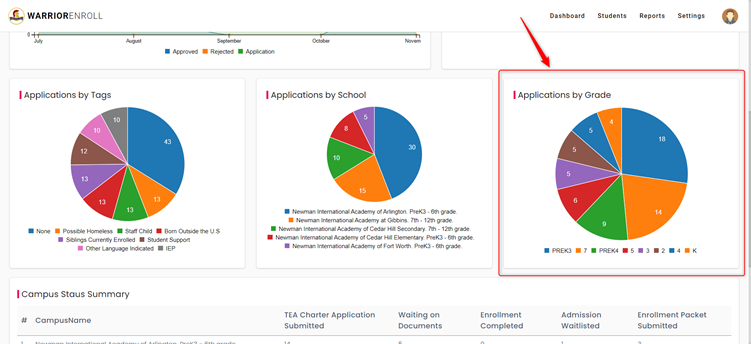
Application by Grade
- Overview: This section displays the breakdown of student applications by grade.
- Visualization: This data is also represented in a Pie Chart, showing the distribution of applications by different grade levels. The chart highlights the grade with the highest number of applications.
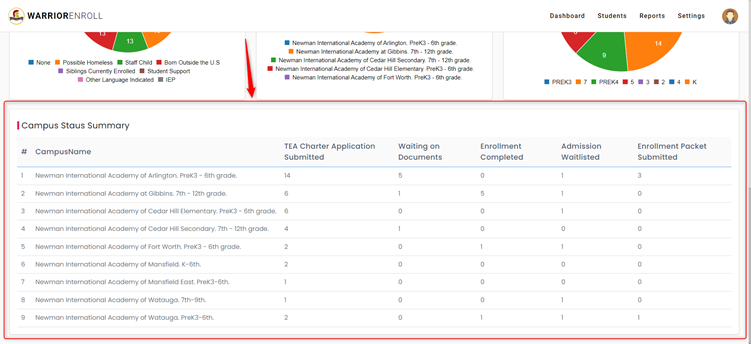
Campus Status Summary
- Overview: This section provides a summary of the campus-specific application statuses.
- Details Displayed:
- Campus Name: Name of the campus.
- TEA Charter Application Submitted: Indicates whether the TEA (Texas Education Agency) Charter Application has been submitted for the campus.
- Waiting on Documents: Displays the number of applications where documents are still pending.
- Enrollment Completed: Shows how many students have completed the enrollment process.
- Admission Waitlisted: Indicates the number of students placed on the admission waitlist.
- Enrollment Packet Submitted: Reflects the number of students who have submitted their enrollment packets.
Was this article helpful?
That’s Great!
Thank you for your feedback
Sorry! We couldn't be helpful
Thank you for your feedback
Feedback sent
We appreciate your effort and will try to fix the article